Diagnose the missing step
A recruit can be attractive for several different reasons: a battlefield role, a support task, or a character storyline. Decide which reason matters to your campaign before changing the roster. That makes a recruitment problem easier to diagnose.
In nalmar's legacy walkthrough, spare national power matters for recruitment and reinforcements. It also warns against filling the prison when captures are important. These are legacy observations, not a guarantee of every character's behavior in the Steam release.
Use three separate checks
| Check | What to inspect | What not to assume |
|---|---|---|
| Capacity | The current roster cost and national power shown by your game | A hidden event bug is the only possible explanation. |
| Recruitment command | The available command, requirements and eligible units | Winning the fight automatically finishes recruitment. |
| Character progress | Recent conversations, faction state and route notes | Every named commander uses the same conditions. |
Start with a screenshot or written note of these three areas. It is more useful than searching only for the character's name and repeating the first answer you find.
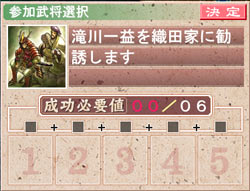
The 2012 FAQ explains that negotiation, exploration and construction requirements can be reduced across multiple actions. If a check exceeds your available total, inspect the requirement again after a contribution instead of assuming it must all be completed at once. Confirm this legacy behavior in your edition before building a strict action schedule around it.
Give every recruit a purpose
Before committing to a new unit, write one sentence: “I want this commander for ___.” A battlefield role, a needed support task or a planned story branch are all reasonable answers. “The guide mentioned them” is a reason to investigate, not enough by itself to reorganize your army.
If you are following a strict legacy opening, stay aware that extra recruitment can change its resource assumptions. If you are playing freely, use the walkthrough as a source of conditions instead of copying its entire roster without understanding why.
When a named unit is still missing
Keep a save from before the relevant decision. Compare the guide's version, playthrough type and event state with yours, then investigate the specific mismatch. Avoid dismissing a useful commander solely to test a theory; note the consequences and use a separate save first.
The legacy FAQ covers commander and recruitment questions, but its answers predate Steam. Check the version guide before applying them, and the route overview if the character belongs to a later-playthrough plan.
Sources & version scope
- nalmar — True History walkthrough — Unofficial English v1.0 patch; first play separated from repeat play.
- KrossRoads / DarkMaster22 — FAQ v1.5.5 — 2012 legacy FAQ; not Steam build testing.
Sources checked 2026-10-06. This is source-based editorial guidance; no first-hand Steam playtest is claimed.